


| Starts | 29 Aug 2026 (Sat) | Ends | 19 Dec 2026 (Sat) |
|---|---|---|---|
| Location | Not Specified |
| We are now on Telegram. Click to join |
DBS PayLah! Saturday cashback is returning from 29 Aug to 19 Dec 2026, giving eligible shoppers 100% cashback of up to $3 every Saturday when scanning and paying with PayLah! at participating heartland shops, wet markets, coffee shops and hawkers island-wide.
Across the 17 Saturdays in the campaign period, cashback is limited to the first 160,000 qualifying transactions each Saturday on a first-come, first-served basis, starting from 6AM until fully redeemed. Each user is limited to one qualifying redemption every Saturday.
- Cashback timing: DBS indicates that successful cashback is credited within the same day. If cashback is not accorded upon completion of the qualifying transaction, the formal campaign T&Cs provide for crediting within seven working days. 💰
- Important payment condition: Seeing a QR code or being able to pay with PayLah! does not automatically mean the transaction qualifies. Payment must be made in person at a participating merchant using an eligible SGQR, NETS QR or PayNow UEN QR route. Personal QR transfers and certain third-party payment-provider routes are excluded. Check the merchant and payment source before confirming the transaction.
- Important redemption rule: There is no minimum spend, but only the first eligible transaction each Saturday receives cashback. For example, a S$1 first eligible purchase earns S$1 cashback only; a later purchase that Saturday cannot be used to claim the unused S$2 portion of the $3 cap.
| Promotion detail | What to note |
|---|---|
| Cashback | 100% of the first eligible transaction, capped at $3 |
| Minimum spend | None |
| Promotion days | Every Saturday from 29 Aug to 19 Dec 2026 |
| Saturday quota | First 160,000 qualifying transactions, on a first-come, first-served basis |
| Start time | From 6AM each Saturday until the day’s allocation is fully redeemed |
| Redemption limit | 1 qualifying redemption per user each Saturday |
| Where it applies | Participating heartland shops, wet markets, coffee shops, hawkers and JTC industrial canteens listed by DBS |
| Payment method | Eligible in-person PayLah! Scan & Pay transactions using SGQR, NETS QR or PayNow UEN QR |
| Cashback credit | DBS indicates successful cashback is generally credited after the qualifying transaction; formal T&Cs allow up to 7 working days if it is not accorded on completion |
For the best chance of securing the cashback, consider making the first eligible Saturday purchase after 6AM rather than leaving it until later in the day, as the allocation can be fully redeemed. ⏰
Click on a link to jump to a specific section
- What does up to $3 cashback mean?
- How to scan and pay with PayLah!
- Check cashback availability and troubleshoot missing cashback
- Can the offer be redeemed every week?
- Where is the offer available?
- Getting started with PayLah!
What does up to $3 cashback mean?
The promotion gives 100% cashback on the eligible PayLah! payment, capped at $3. For example, an eligible S$2 purchase can receive S$2 cashback, while an eligible S$5 purchase can receive up to $3 cashback. The credited amount cannot exceed the actual eligible payment or the $3 campaign cap.

How to scan and pay with PayLah!
Step 1: Log in to the PayLah! app
Open the PayLah! app and look for the relevant PayLah! or “POSB supports our heartland shops” identifiers at eligible merchants before making payment.
At heartland shops, wet markets and coffee shops, look for the POSB wobbler at NETS and PayNow UEN QR-enabled shops across neighbourhoods:
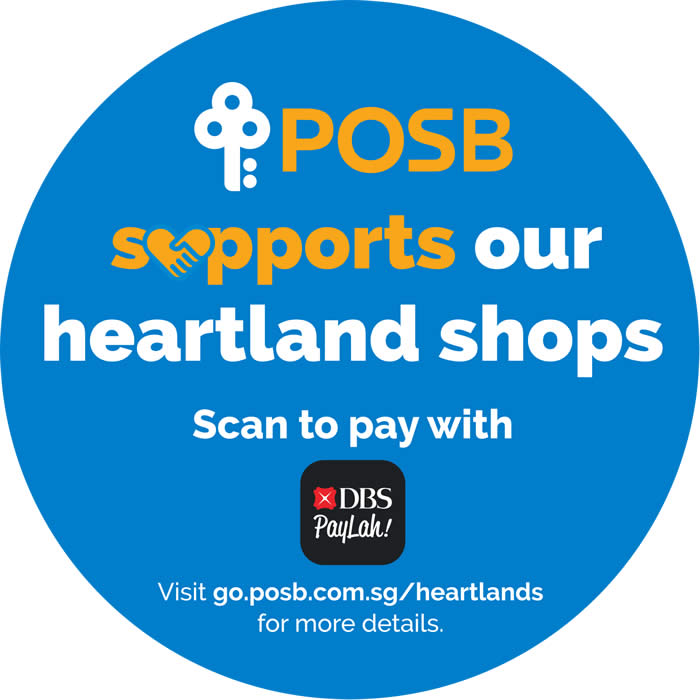
(Above) “POSB supports our heartland shops” sticker at heartland shops, wet markets and coffee shops.
At hawker stalls, look for an SGQR code carrying the PayLah! logo or a PayLah! sticker:

(Above) PayLah! sticker at hawker stalls.
Step 2: Scan to pay for the purchase with PayLah!
Use PayLah! Scan & Pay in person at a participating merchant. Eligible payments use SGQR with an eligible payment rail, NETS QR or PayNow UEN QR. If an SGQR presents several payment options, select “PayLah!/NETS QR” or “PayNow QR” before completing payment. Personal PayNow or PayLah! QR transfers do not qualify. PayNow UEN QR payments routed through payment providers excluded by DBS are also ineligible. Transactions paid using DBS Rewards Flexi eVoucher do not qualify. Check the merchant name and payment source carefully before confirming. 📱

Step 3: Receive 100% cashback, capped at $3
When the transaction qualifies and the Saturday allocation remains available, 100% cashback is awarded on the first eligible transaction, capped at S$3, with one qualifying redemption allowed per user each Saturday.

For PayLah! users with the required digibank access, the auto-debit function can reduce manual top-ups. DBS’s setup process requires authentication using a digibank User ID and PIN, so this convenience option may not apply to every PayLah! user.
Read the full Terms and Conditions (PDF) for the campaign rules.
Check the full list of participating merchants (PDF) before spending.
Check the transaction history for the cashback
After payment, open the PayLah! transaction history and select the transaction to check whether cashback has been credited.

Check cashback availability and troubleshoot missing cashback
Check the top of the PayLah! homepage before paying. If the Saturday allocation has been exhausted, the app banner should display “FULLY REDEEMED”. This quick check can help avoid making a purchase solely for cashback after the allocation has run out.
If cashback is missing: Check that the spend was made at a participating merchant, review the transaction’s payment source/type, confirm that the Saturday allocation had not been fully redeemed and check whether another eligible transaction had already received cashback that Saturday. DBS’s FAQ also notes that a PayLah! wallet limit lower than the wallet balance can prevent cashback from being credited. If further help is needed, keep the transaction date, shop name and shop address ready when contacting DBS support.

Can the offer be redeemed every week?
Yes. A fresh redemption can be made on each campaign Saturday, provided the day’s allocation has not been fully redeemed and all eligibility conditions are met. The limit remains one redemption per user per week.
Since the cashback applies to the first eligible purchase redeemed for the week, consider using it on a purchase of at least $3 to make full use of the maximum cashback cap. 🛍️
Where is the offer available?
Accepting PayLah! alone does not make a shop or stall eligible. The merchant must appear on DBS’s current participating merchant list and the transaction must use an eligible payment route. The official campaign FAQ also includes participating JTC industrial canteens among the locations where cashback may be available.
The campaign does not apply to every shop or merchant category. Excluded categories listed in the source content include agencies such as travel agencies and domestic help agencies, associations and clubs, car rental businesses, charity organisations, commercial malls, design studios such as interior design firms, hotels and hostels, learning centres, medical services such as general practitioners, petrol stations, pharmacies, places of worship, schools and vets.
Shops inside commercially owned shopping malls, including examples such as Bugis Junction, Great World City and Tanglin Mall, are not applicable for the campaign.
Before making a purchase, refer to the participating shops and locations list (PDF). The list may be updated during the campaign, so a fresh check can help confirm eligibility.
For detailed payment eligibility, excluded QR payment types and cashback troubleshooting, read the DBS Saturday Savings campaign FAQs (PDF).
Getting started with PayLah!
Getting started depends on account status. DBS/POSB customers can register for PayLah! through digibank, while Singaporeans and Permanent Residents without a DBS/POSB deposit account can register using Singpass. DBS also requires a unique Singapore-registered mobile number, with iOS 15.0 or later or Android 12.0 or later currently specified for the app. Download PayLah! from the App Store or Google Play. For registration requirements and setup steps, see the official PayLah! registration guide.
- For campaign information, visit the DBS PayLah! Saturdays promotion page.
- For general DBS PayLah! information, visit the DBS PayLah! page.
With up to $3 cashback available every Saturday during the campaign period, this promotion can be a useful small saving on routine heartland spending. Check merchant eligibility and the in-app redemption status before payment, then complete the first eligible weekly transaction while the allocation remains available. ✅
More DBS/POSB Deals
- $3 off selected eggs and rice every Saturday with DBS/POSB Cards – runs from 18 Jul to 29 Aug 2026. This is a separate card promotion with different redemption conditions.
- Golden Village DBS/POSB movie deals – runs until 31 Dec 2026 and includes selected PayLah! payment options.


Leave a Reply